Organizing with folders and tags
You get both. They’re good at different things.
Folders
Section titled “Folders”Ordinary folders on disk. Make them in Pellet or in Finder — it’s the same thing either way, and Pellet notices immediately.
A note lives in exactly one folder, which makes folders good for questions with one answer: is this work or personal?
Drag notes between folders in the sidebar, and folders into other folders — dragging is how things move. Right-click a folder for the rest: rename it, delete it, make a new note or subfolder inside it, choose whether the row shows a file count, or reveal it in your file manager.
Folder colors
Section titled “Folder colors”Click a folder’s icon to open its style popover. You can swap the icon for another one or an emoji, and give the folder a color.
A color has to paint on something, so you choose what: the icon, the folder name, the row background, or any combination. Tinting the row background is the loudest; coloring just the icon is the one you can use on twenty folders without the sidebar becoming a rainbow.
Subfolders too makes the color cascade down. A project folder with eight subfolders then needs the color set once instead of nine times, and a subfolder added next month picks it up on its own. A subfolder with a color of its own always keeps it — cascading never overwrites a decision you made. Colors reach past ancestors that aren’t cascading, so a folder with a color of its own doesn’t block one coming from further up.
Type # followed by a word anywhere in a note. A note can carry as many tags as you like, which makes tags good for questions with several answers at once: this is about a client, and it’s a meeting, and it’s urgent.
Nested tags put one tag inside another, using slashes:
That one tag gives you work, work/clients and work/clients/norvale — a tree in the Tags explorer, the pane down the left, with counts that roll up. Click any level to see everything beneath it.

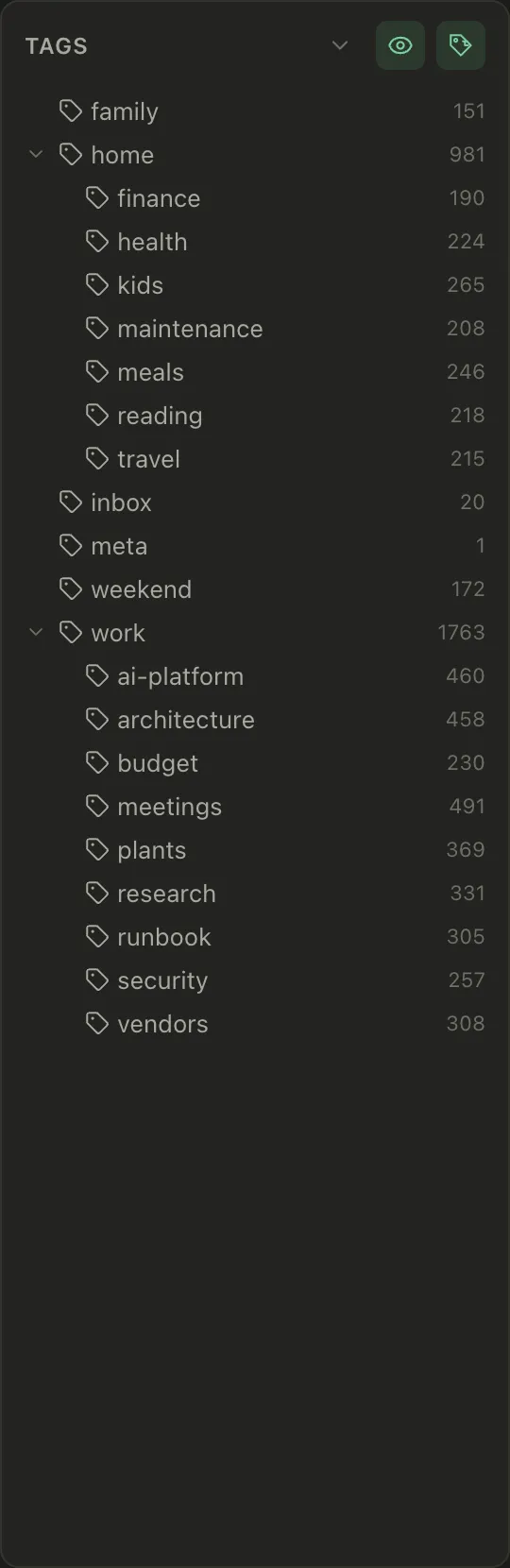
There’s a filter box under the header. Type into it and the tree narrows to matching tags, keeping the parents above each match so you can still see where it sits — handy once you have more tags than fit on screen. Escape clears it.
Renaming and deleting tags
Section titled “Renaming and deleting tags”Tags spread. You start with #work, then #Work creeps in, then you decide
#clients should have lived under #work all along. Right-click any branch in
the Tags explorer to rename or delete it.
Both act on the whole branch. Renaming work to job also renames
work/clients and work/clients/norvale, because that’s the branch you clicked
and the count you saw. #workshop is left alone — it only matches at a / or
at the end, and case matters, so Work and work stay separate.
Every file carrying the tag is rewritten: in frontmatter and inline, in whatever
style you wrote it, and nothing else in the file moves. A #tag inside a code
block stays as it is. Pellet tells you how many tags and how many files are
about to change before it does anything.
Deleting a tag deletes the tag, never the notes. Every note stays exactly where it is, minus that one tag. And if file history is on, each edited note has a revision you can roll back one at a time.
Which to use
Section titled “Which to use”A rough rule that holds up: folders for where something belongs, tags for what it’s about. If you find yourself wanting to put one note in two folders, that’s a tag.
Don’t over-plan it. A flat vault with good links and a search box is easier to live with than a filing system you have to think about every time you write something down.
Gallery view
Section titled “Gallery view”If your vault has a lot of canvases, drawings or PDFs, the note list can show thumbnails instead of rows — the toggle is in the note list header. It’s one setting for the whole vault, so a folder never surprises you by looking different, and there are three tile sizes.